> ## Documentation Index
> Fetch the complete documentation index at: https://docs.monk.io/llms.txt
> Use this file to discover all available pages before exploring further.
# Build & CI/CD
> Autonomous build and deployment pipelines
## What It Does
Once your app's deployed, Monk sets up continuous deployment. Every code push automatically updates your running application. No GitHub Actions workflows to write. No secrets to configure. No container registry setup.
Tell Monk to set up CI. Your app auto-deploys on every push to main.
## How to Set It Up
### Trigger CI/CD Setup
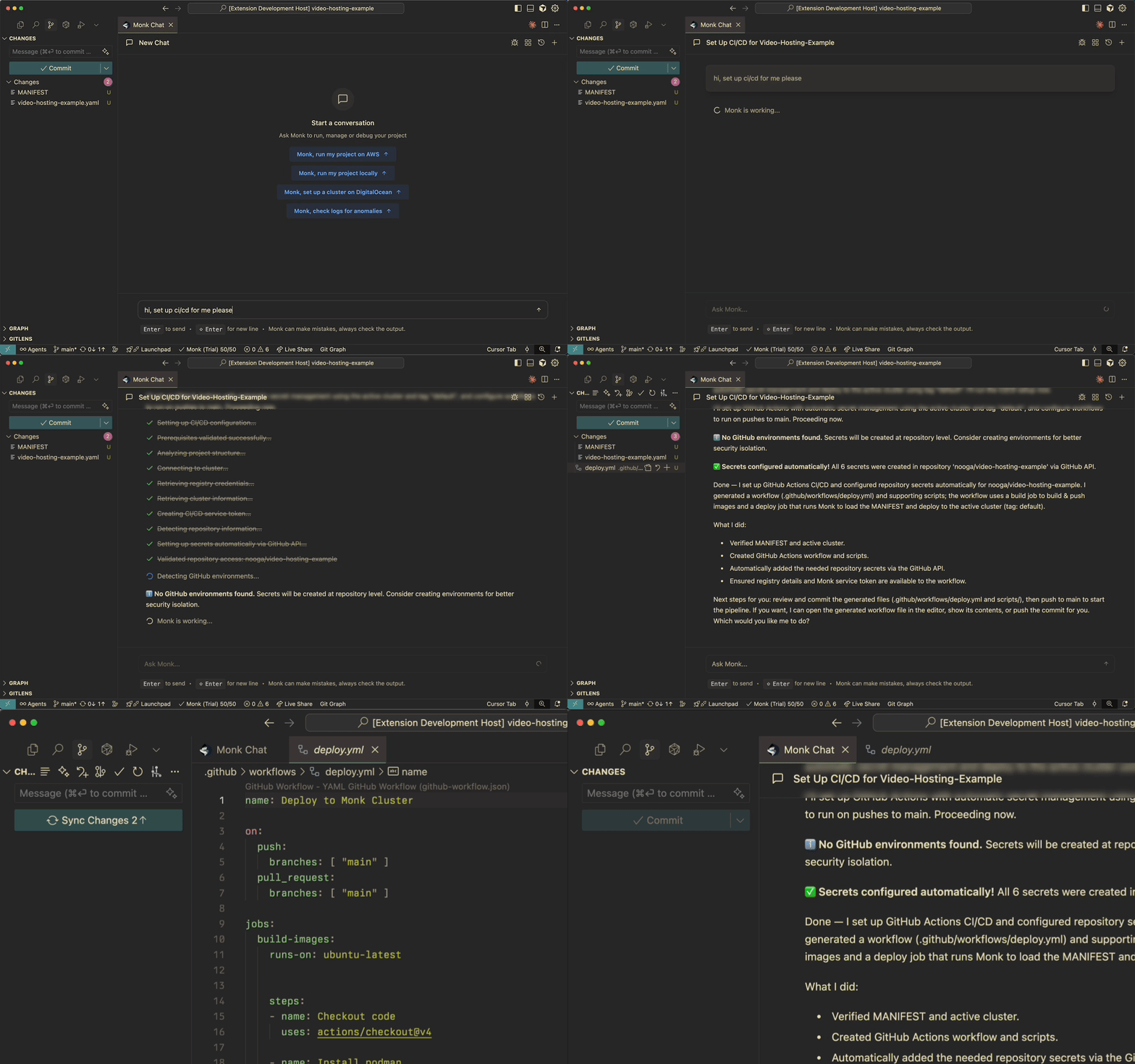
After your app is deployed, chat with Monk in your [IDE](/features/vscode-integration):
**You:** `set up CI/CD for this project`
Monk walks you through the rest.
 ### Prerequisites
You'll need:
1. **GitHub repository** - Your project must live in a GitHub repo
2. **Deployed application** - Your project must already be [deployed](/features/autonomous-deployment) and running
3. **GitHub PAT (optional)** - A [Personal Access Token](https://docs.github.com/en/authentication/keeping-your-account-and-data-secure/managing-your-personal-access-tokens) lets Monk automate the full setup
**Without a PAT:** Monk generates the necessary files and walks you
through manual GitHub configuration. **With a PAT:** Monk handles everything
automatically, including secure injection of deployment keys.
## How It Works
### Step 1: Configuration
Once you ask Monk to configure CI and [code analysis](/features/code-analysis) completes, Monk:
1. **Generates a GitHub Action workflow** - Creates `.github/workflows/deploy.yml`
2. **Configures intelligent rebuilds** - Only rebuilds what changed:
* [Service configuration](/features/configuration-and-wiring) updates
* [Container](/features/containerization) rebuilds when code changes
* Dependency updates when needed
### Step 2: Deployment Keys
**If you provided a GitHub PAT:**
* Monk injects deployment keys into your repository secrets
* Everything's configured automatically
* You just commit and push
**If you didn't provide a PAT:**
* Monk generates the necessary secrets
* Gives you step-by-step instructions for manual GitHub configuration
* Shows you exactly where to paste each secret
### Step 3: Activation
1. **Review the changes** - Monk shows you the generated workflow file
2. **Commit and push** - The changes go into your repository
3. **That's it** - Every push to `main` updates your deployment from here on
### The Build Process
The CI job mirrors what happened during initial deployment.
**On every push to main:**
1. **Code analysis** - Monk analyzes what changed
2. **Configuration update** - Updates [service configuration](/features/configuration-and-wiring) if needed
3. **Container rebuild** - Rebuilds [containers](/features/containerization) for modified services
4. **Zero-downtime deployment** - Monk's orchestrator updates running services without interruption
5. **Verification** - Confirms updated services are healthy
**Smart rebuilds:**
* Changed frontend — rebuilds and redeploys frontend only
* Changed API code — rebuilds API container, rolling update in production
* Changed worker — rebuilds worker container, replaces instances
* No code changes — skips unnecessary builds
## Currently Supported
**CI/CD Platform:**
* **GitHub Actions** - Fully supported
Support for Jenkins, GitLab CI/CD, Bitbucket Pipelines, and Azure DevOps is on the roadmap. [Vote on what to prioritize](https://monk.io/roadmap).
## CI/CD vs. Capsules
CI/CD deploys a selected branch (typically `main`) to your existing, long-lived cluster — your production or staging environment. It's the pipeline that keeps your deployed application up to date with every merge.
[Capsules](/features/capsules) take this further: they use CI/CD to spin up an isolated, ephemeral cluster for every feature branch. Each cluster lives only as long as the branch does. Where CI/CD answers "how do I ship `main`?", Capsules answers "how do I test every branch in a real environment before it reaches `main`?"
You can use either or both. Most teams start with CI/CD for their main deployment and add Capsules when they want per-branch preview environments.
## Related Features
Per-branch preview environments — isolated, ephemeral clusters for every branch.
How Monk handles your initial deployment before CI/CD kicks in.
How Monk builds and rebuilds containers during the CI process.
### Prerequisites
You'll need:
1. **GitHub repository** - Your project must live in a GitHub repo
2. **Deployed application** - Your project must already be [deployed](/features/autonomous-deployment) and running
3. **GitHub PAT (optional)** - A [Personal Access Token](https://docs.github.com/en/authentication/keeping-your-account-and-data-secure/managing-your-personal-access-tokens) lets Monk automate the full setup
**Without a PAT:** Monk generates the necessary files and walks you
through manual GitHub configuration. **With a PAT:** Monk handles everything
automatically, including secure injection of deployment keys.
## How It Works
### Step 1: Configuration
Once you ask Monk to configure CI and [code analysis](/features/code-analysis) completes, Monk:
1. **Generates a GitHub Action workflow** - Creates `.github/workflows/deploy.yml`
2. **Configures intelligent rebuilds** - Only rebuilds what changed:
* [Service configuration](/features/configuration-and-wiring) updates
* [Container](/features/containerization) rebuilds when code changes
* Dependency updates when needed
### Step 2: Deployment Keys
**If you provided a GitHub PAT:**
* Monk injects deployment keys into your repository secrets
* Everything's configured automatically
* You just commit and push
**If you didn't provide a PAT:**
* Monk generates the necessary secrets
* Gives you step-by-step instructions for manual GitHub configuration
* Shows you exactly where to paste each secret
### Step 3: Activation
1. **Review the changes** - Monk shows you the generated workflow file
2. **Commit and push** - The changes go into your repository
3. **That's it** - Every push to `main` updates your deployment from here on
### The Build Process
The CI job mirrors what happened during initial deployment.
**On every push to main:**
1. **Code analysis** - Monk analyzes what changed
2. **Configuration update** - Updates [service configuration](/features/configuration-and-wiring) if needed
3. **Container rebuild** - Rebuilds [containers](/features/containerization) for modified services
4. **Zero-downtime deployment** - Monk's orchestrator updates running services without interruption
5. **Verification** - Confirms updated services are healthy
**Smart rebuilds:**
* Changed frontend — rebuilds and redeploys frontend only
* Changed API code — rebuilds API container, rolling update in production
* Changed worker — rebuilds worker container, replaces instances
* No code changes — skips unnecessary builds
## Currently Supported
**CI/CD Platform:**
* **GitHub Actions** - Fully supported
Support for Jenkins, GitLab CI/CD, Bitbucket Pipelines, and Azure DevOps is on the roadmap. [Vote on what to prioritize](https://monk.io/roadmap).
## CI/CD vs. Capsules
CI/CD deploys a selected branch (typically `main`) to your existing, long-lived cluster — your production or staging environment. It's the pipeline that keeps your deployed application up to date with every merge.
[Capsules](/features/capsules) take this further: they use CI/CD to spin up an isolated, ephemeral cluster for every feature branch. Each cluster lives only as long as the branch does. Where CI/CD answers "how do I ship `main`?", Capsules answers "how do I test every branch in a real environment before it reaches `main`?"
You can use either or both. Most teams start with CI/CD for their main deployment and add Capsules when they want per-branch preview environments.
## Related Features
Per-branch preview environments — isolated, ephemeral clusters for every branch.
How Monk handles your initial deployment before CI/CD kicks in.
How Monk builds and rebuilds containers during the CI process.