> ## Documentation Index
> Fetch the complete documentation index at: https://docs.monk.io/llms.txt
> Use this file to discover all available pages before exploring further.
# Containerization & Orchestration
> Automatic containerization and workload management
## What It Does
Your backend services — API servers, workers, background jobs — need to run somewhere. You put them in containers that can run on any cloud VM.
After Monk [analyzes your code](/features/code-analysis), it containerizes the components that need it, tests them, and prepares them for deployment. No Containerfiles required. If you have them, Monk uses them.
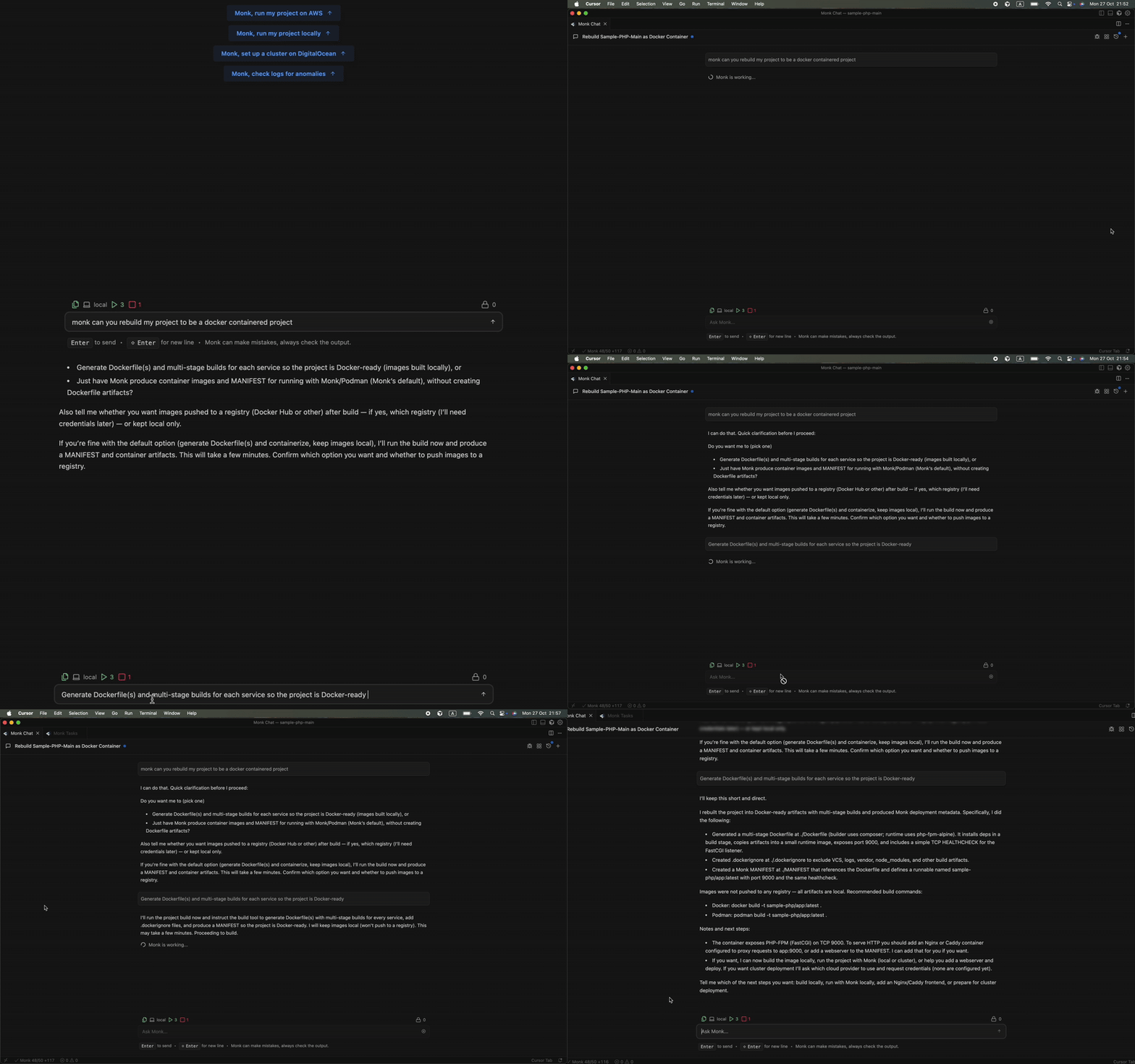 ## How Containerization Works
### Automatic Container Creation
After code analysis, Monk identifies which components need containerization:
* **API servers** — Express, FastAPI, Spring Boot, Go HTTP servers, etc.
* **Backend services** — Node.js, Python, Go, Java, Ruby, .NET services
* **Workers** — Celery, Sidekiq, background job processors
* **Scheduled tasks** — Cron jobs, periodic workers
For each component, Monk either uses your existing container configuration or generates one from scratch.
### Using Existing Containerfiles
If you already have a `Containerfile`, Monk will:
1. **Build it** — Uses your existing configuration as-is
2. **Test the container** — Boots it up to verify it works
3. **Iterate if needed** — If there are issues, Monk fixes them automatically
4. **Optimize if possible** — Suggests improvements for security and performance
### Generating New Containerfiles
No Containerfile? Monk generates one using best practices.
**Multi-stage builds** — Separate build and runtime stages to minimize image size:
```
# Example of what Monk generates for a Node.js API
FROM node:18-alpine AS builder
WORKDIR /app
COPY package*.json ./
RUN npm ci --only=production
FROM node:18-alpine
WORKDIR /app
COPY --from=builder /app/node_modules ./node_modules
COPY . .
EXPOSE 3000
CMD ["node", "server.js"]
```
What you'll see in practice:
* **Small base images** — Alpine Linux or distroless when possible
* **Security hardened** — Non-root users, minimal attack surface
* **Optimized layers** — Proper caching for faster builds
* **Framework-specific** — Tailored to Django, Rails, Spring Boot, etc.
### Testing & Iteration
Monk doesn't just generate containers. It validates they work.
1. **Builds the container** locally in your IDE
2. **Starts the container** and tests if the service boots
3. **Checks health** to verify the service responds
4. **Fixes issues** — if problems occur, Monk iterates until they're resolved
**Example iteration:**
```
Monk: Built container for API server
Monk: Testing... Port 3000 not accessible
Monk: Issue found - server.js listens on port 8080, Containerfile exposes 3000
Monk: I can fix the port in your code. Should I proceed?
You: Yes
Monk: Fixed server.js to use PORT env var, rebuilding...
Monk: Testing... Success! Container running on port 3000
```
Monk can make targeted code fixes to resolve deployment issues.
> See [Source Code Editing](/features/code-editing) for details on code fixes
### Local Build + CI/CD Integration
Containerization happens in two places:
**Locally** — Right in your IDE when you first deploy. Monk builds containers on your machine so you can test and verify before anything goes to production.
**CI/CD** — Monk [configures your pipeline](/features/build-and-cicd) so containers rebuild automatically when you push changes. Your production images stay current without manual intervention.
### Zero-Config Container Registry
Every Monk deployment includes a private container registry. No setup required.
* Your container images are stored securely
* Direct push from your machine or CI workflow
* Images deploy straight to the runtime environment
* No external registry accounts needed
**BYOI principle:** The container registry runs on your infrastructure, just
like everything else Monk manages. Your images never leave your control.
## How Orchestration Works
### Monk's Built-in Orchestrator
Monk includes a distributed orchestrator that manages all your containers regardless of where they run. It doesn't use Kubernetes under the hood.
What this means for you:
* **Direct control** — Monk manages containers natively, no abstraction layers
* **Multi-cloud aware** — Works across AWS, GCP, Azure, DigitalOcean, Hetzner
* **Unified control plane** — Replaces both Terraform and Kubernetes functions
* **Resource efficient** — No K8s overhead or complexity
### What the Orchestrator Handles
**Live resource tracking** — A real-time resource graph of your entire infrastructure. It understands dependencies, relationships, and the lifecycle of every component.
**Networking** — Automatic network segmentation, encrypted service-to-service connections, cross-region and cross-cloud support. See [Networking](/features/networking) for details.
**Cost awareness** — Tracks the cost of each resource over time. See [Cost Tracking](/features/cost-tracking) for real-time monitoring.
**Multi-cloud orchestration** — Manages containers across different providers simultaneously. One-command cluster spin-up. Works on-prem too. See [Multi-Cloud Support](/features/multi-cloud) for details.
### Universal Container Support
While Monk provides a private registry, it pulls from anywhere — AWS ECR, Google Container Registry, Azure Container Registry, public registries, private registries. You provide the address and credentials, and Monk handles the rest.
## Example: Multi-Service Application
Here's containerization in action with a Python + Node.js app.
**Your application:**
* FastAPI backend (Python)
* React frontend (doesn't need containerization — goes to Netlify)
* Celery worker (Python)
* PostgreSQL database (managed service — no container needed)
**What Monk does:**
1. **Analyzes components** — FastAPI and Celery need containers
2. **Generates Containerfiles:**
```
# FastAPI
FROM python:3.11-slim
WORKDIR /app
COPY requirements.txt .
RUN pip install -r requirements.txt
COPY . .
CMD ["uvicorn", "main:app", "--host", "0.0.0.0", "--port", "8000"]
# Celery
FROM python:3.11-slim
WORKDIR /app
COPY requirements.txt .
RUN pip install -r requirements.txt
COPY . .
CMD ["celery", "-A", "tasks", "worker"]
```
3. **Builds and tests** both containers locally
4. **Pushes to registry** in your cloud account
5. **Deploys containers** with proper orchestration
How Monk understands what to containerize
Automatic container rebuilds on every push
## How Containerization Works
### Automatic Container Creation
After code analysis, Monk identifies which components need containerization:
* **API servers** — Express, FastAPI, Spring Boot, Go HTTP servers, etc.
* **Backend services** — Node.js, Python, Go, Java, Ruby, .NET services
* **Workers** — Celery, Sidekiq, background job processors
* **Scheduled tasks** — Cron jobs, periodic workers
For each component, Monk either uses your existing container configuration or generates one from scratch.
### Using Existing Containerfiles
If you already have a `Containerfile`, Monk will:
1. **Build it** — Uses your existing configuration as-is
2. **Test the container** — Boots it up to verify it works
3. **Iterate if needed** — If there are issues, Monk fixes them automatically
4. **Optimize if possible** — Suggests improvements for security and performance
### Generating New Containerfiles
No Containerfile? Monk generates one using best practices.
**Multi-stage builds** — Separate build and runtime stages to minimize image size:
```
# Example of what Monk generates for a Node.js API
FROM node:18-alpine AS builder
WORKDIR /app
COPY package*.json ./
RUN npm ci --only=production
FROM node:18-alpine
WORKDIR /app
COPY --from=builder /app/node_modules ./node_modules
COPY . .
EXPOSE 3000
CMD ["node", "server.js"]
```
What you'll see in practice:
* **Small base images** — Alpine Linux or distroless when possible
* **Security hardened** — Non-root users, minimal attack surface
* **Optimized layers** — Proper caching for faster builds
* **Framework-specific** — Tailored to Django, Rails, Spring Boot, etc.
### Testing & Iteration
Monk doesn't just generate containers. It validates they work.
1. **Builds the container** locally in your IDE
2. **Starts the container** and tests if the service boots
3. **Checks health** to verify the service responds
4. **Fixes issues** — if problems occur, Monk iterates until they're resolved
**Example iteration:**
```
Monk: Built container for API server
Monk: Testing... Port 3000 not accessible
Monk: Issue found - server.js listens on port 8080, Containerfile exposes 3000
Monk: I can fix the port in your code. Should I proceed?
You: Yes
Monk: Fixed server.js to use PORT env var, rebuilding...
Monk: Testing... Success! Container running on port 3000
```
Monk can make targeted code fixes to resolve deployment issues.
> See [Source Code Editing](/features/code-editing) for details on code fixes
### Local Build + CI/CD Integration
Containerization happens in two places:
**Locally** — Right in your IDE when you first deploy. Monk builds containers on your machine so you can test and verify before anything goes to production.
**CI/CD** — Monk [configures your pipeline](/features/build-and-cicd) so containers rebuild automatically when you push changes. Your production images stay current without manual intervention.
### Zero-Config Container Registry
Every Monk deployment includes a private container registry. No setup required.
* Your container images are stored securely
* Direct push from your machine or CI workflow
* Images deploy straight to the runtime environment
* No external registry accounts needed
**BYOI principle:** The container registry runs on your infrastructure, just
like everything else Monk manages. Your images never leave your control.
## How Orchestration Works
### Monk's Built-in Orchestrator
Monk includes a distributed orchestrator that manages all your containers regardless of where they run. It doesn't use Kubernetes under the hood.
What this means for you:
* **Direct control** — Monk manages containers natively, no abstraction layers
* **Multi-cloud aware** — Works across AWS, GCP, Azure, DigitalOcean, Hetzner
* **Unified control plane** — Replaces both Terraform and Kubernetes functions
* **Resource efficient** — No K8s overhead or complexity
### What the Orchestrator Handles
**Live resource tracking** — A real-time resource graph of your entire infrastructure. It understands dependencies, relationships, and the lifecycle of every component.
**Networking** — Automatic network segmentation, encrypted service-to-service connections, cross-region and cross-cloud support. See [Networking](/features/networking) for details.
**Cost awareness** — Tracks the cost of each resource over time. See [Cost Tracking](/features/cost-tracking) for real-time monitoring.
**Multi-cloud orchestration** — Manages containers across different providers simultaneously. One-command cluster spin-up. Works on-prem too. See [Multi-Cloud Support](/features/multi-cloud) for details.
### Universal Container Support
While Monk provides a private registry, it pulls from anywhere — AWS ECR, Google Container Registry, Azure Container Registry, public registries, private registries. You provide the address and credentials, and Monk handles the rest.
## Example: Multi-Service Application
Here's containerization in action with a Python + Node.js app.
**Your application:**
* FastAPI backend (Python)
* React frontend (doesn't need containerization — goes to Netlify)
* Celery worker (Python)
* PostgreSQL database (managed service — no container needed)
**What Monk does:**
1. **Analyzes components** — FastAPI and Celery need containers
2. **Generates Containerfiles:**
```
# FastAPI
FROM python:3.11-slim
WORKDIR /app
COPY requirements.txt .
RUN pip install -r requirements.txt
COPY . .
CMD ["uvicorn", "main:app", "--host", "0.0.0.0", "--port", "8000"]
# Celery
FROM python:3.11-slim
WORKDIR /app
COPY requirements.txt .
RUN pip install -r requirements.txt
COPY . .
CMD ["celery", "-A", "tasks", "worker"]
```
3. **Builds and tests** both containers locally
4. **Pushes to registry** in your cloud account
5. **Deploys containers** with proper orchestration
How Monk understands what to containerize
Automatic container rebuilds on every push