> ## Documentation Index
> Fetch the complete documentation index at: https://docs.monk.io/llms.txt
> Use this file to discover all available pages before exploring further.
# Scaling
> Scale resources with natural language
## What It Does
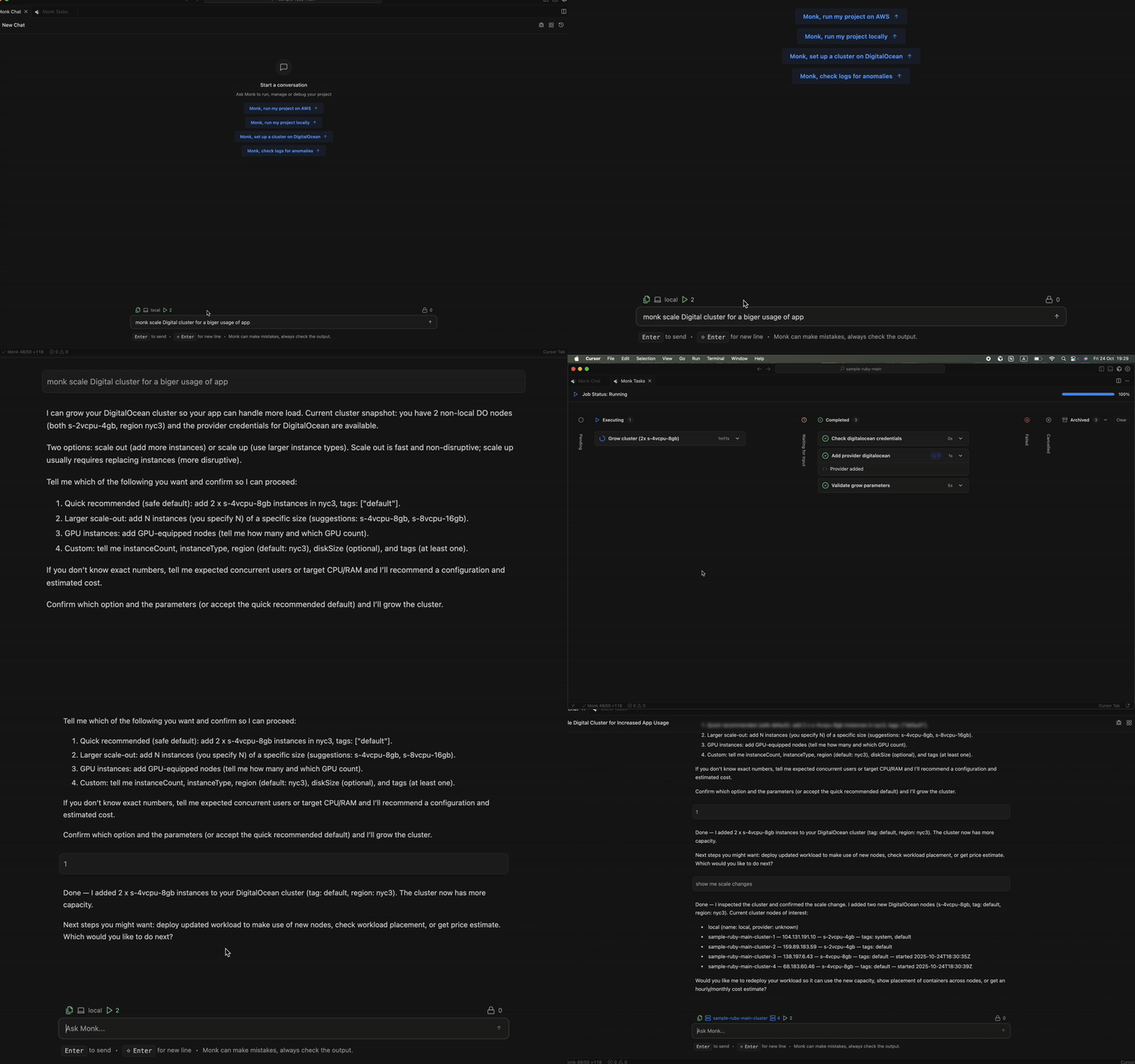
Monk scales your entire system — workloads and infrastructure. An algorithmic autoscaler handles workload scaling automatically. You tell Monk to scale infrastructure with plain language. That's it.
 ## How It Works
### Algorithmic Workload Autoscaling
Monk's autoscaler manages your [containerized workloads](/features/containerization) without you lifting a finger.
**What it handles:**
* Horizontal scaling — adds or removes container replicas based on load
* Resource-based scaling — scales on CPU and memory utilization
* Automatic load balancing — distributes traffic across scaled replicas
**Example:**
Your API server starts with 2 replicas. Traffic spikes during peak hours. The autoscaler spins up replicas — 3, 4, 5. Traffic drops. It scales back down. You don't do anything.
The autoscaler runs continuously in the background as part of orchestration. No manual intervention required as long as autoscaling rules exist in your Monk configuration.
### Infrastructure Scaling
Beyond workloads, Monk scales the underlying infrastructure itself.
**What Monk can scale:**
* Virtual machines — add or remove VMs from your deployment
* Instance sizing — change VM sizes (e.g., 2GB to 4GB RAM)
* Service settings — adjust database connection pools, cache sizes, worker counts
* Storage — increase disk size for databases and persistent volumes
**How to trigger it:**
Tell Monk what you need via chat in your [IDE](/features/vscode-integration):
```
You: Add 2 more machines to the API cluster
```
```
You: Scale the database instance up to 8GB RAM
```
```
You: Increase the worker count to 5
```
```
You: Remove the extra VMs, traffic is back to normal
```
Monk provisions or deprovisions resources using your [cloud provider](/features/cloud-provisioning) accounts. No Terraform. No console clicking.
### Intelligent Scaling Decisions
When you request infrastructure changes, Monk doesn't just execute blindly.
**Instance sizing:**
* Recommends appropriate VM sizes based on current usage
* Suggests cost-effective alternatives
* Warns about over-provisioning
**Placement:**
* Places new VMs in optimal regions
* Co-locates with related services for low latency
* Balances across availability zones when needed
**Cost awareness:**
* Estimates cost impact before you confirm
* Suggests cheaper alternatives when possible
* See [Cost Tracking](/features/cost-tracking) for real-time cost monitoring
**Confirmation before changes:**
```
You: Add more machines to handle this traffic spike
Monk: Current setup: 2x t3.medium instances (4 vCPU, 8GB RAM)
Recommendation: Add 2x t3.medium instances
New total: 4 instances
Cost increase: ~$50/month
Proceed?
You: Yes
```
You stay in control. Monk does the heavy lifting.
### Zero-Downtime Scaling
Whether it's workload autoscaling or infrastructure scaling, Monk ensures zero downtime.
**Workload scaling:**
* New replicas added before old ones removed
* Health checks before traffic routing
* Graceful shutdown of scaled-down replicas
**Infrastructure scaling:**
* New VMs provisioned and containers deployed before traffic shifts
* [Load balancers](/features/networking) updated automatically
* Old VMs drained before shutdown
Proactive AI-driven scaling — autonomous 24/7 scaling, predictive patterns, cost optimization — is on the roadmap. [Vote on what to prioritize](https://monk.io/roadmap).
How Monk provisions and manages your VMs
Real-time cost impact of scaling decisions
## How It Works
### Algorithmic Workload Autoscaling
Monk's autoscaler manages your [containerized workloads](/features/containerization) without you lifting a finger.
**What it handles:**
* Horizontal scaling — adds or removes container replicas based on load
* Resource-based scaling — scales on CPU and memory utilization
* Automatic load balancing — distributes traffic across scaled replicas
**Example:**
Your API server starts with 2 replicas. Traffic spikes during peak hours. The autoscaler spins up replicas — 3, 4, 5. Traffic drops. It scales back down. You don't do anything.
The autoscaler runs continuously in the background as part of orchestration. No manual intervention required as long as autoscaling rules exist in your Monk configuration.
### Infrastructure Scaling
Beyond workloads, Monk scales the underlying infrastructure itself.
**What Monk can scale:**
* Virtual machines — add or remove VMs from your deployment
* Instance sizing — change VM sizes (e.g., 2GB to 4GB RAM)
* Service settings — adjust database connection pools, cache sizes, worker counts
* Storage — increase disk size for databases and persistent volumes
**How to trigger it:**
Tell Monk what you need via chat in your [IDE](/features/vscode-integration):
```
You: Add 2 more machines to the API cluster
```
```
You: Scale the database instance up to 8GB RAM
```
```
You: Increase the worker count to 5
```
```
You: Remove the extra VMs, traffic is back to normal
```
Monk provisions or deprovisions resources using your [cloud provider](/features/cloud-provisioning) accounts. No Terraform. No console clicking.
### Intelligent Scaling Decisions
When you request infrastructure changes, Monk doesn't just execute blindly.
**Instance sizing:**
* Recommends appropriate VM sizes based on current usage
* Suggests cost-effective alternatives
* Warns about over-provisioning
**Placement:**
* Places new VMs in optimal regions
* Co-locates with related services for low latency
* Balances across availability zones when needed
**Cost awareness:**
* Estimates cost impact before you confirm
* Suggests cheaper alternatives when possible
* See [Cost Tracking](/features/cost-tracking) for real-time cost monitoring
**Confirmation before changes:**
```
You: Add more machines to handle this traffic spike
Monk: Current setup: 2x t3.medium instances (4 vCPU, 8GB RAM)
Recommendation: Add 2x t3.medium instances
New total: 4 instances
Cost increase: ~$50/month
Proceed?
You: Yes
```
You stay in control. Monk does the heavy lifting.
### Zero-Downtime Scaling
Whether it's workload autoscaling or infrastructure scaling, Monk ensures zero downtime.
**Workload scaling:**
* New replicas added before old ones removed
* Health checks before traffic routing
* Graceful shutdown of scaled-down replicas
**Infrastructure scaling:**
* New VMs provisioned and containers deployed before traffic shifts
* [Load balancers](/features/networking) updated automatically
* Old VMs drained before shutdown
Proactive AI-driven scaling — autonomous 24/7 scaling, predictive patterns, cost optimization — is on the roadmap. [Vote on what to prioritize](https://monk.io/roadmap).
How Monk provisions and manages your VMs
Real-time cost impact of scaling decisions