> ## Documentation Index
> Fetch the complete documentation index at: https://docs.monk.io/llms.txt
> Use this file to discover all available pages before exploring further.
# Getting Help & Support
> How to get help, report bugs, request features, and connect with the Monk community
## Ways to Get Help
Monk provides multiple channels for getting assistance, reporting issues, and connecting with the community.
## Ask Monk Directly
The fastest way to get help is to **ask Monk directly** in your IDE:
1. Open the Monk chat window (`Cmd+Shift+M` on macOS, `Ctrl+Shift+M` on Windows/Linux)
2. Describe your issue or ask your question
3. Monk will guide you through troubleshooting or take action to resolve the problem
**Example questions:**
* "Why is my deployment failing?"
* "How do I add a Redis cache to my app?"
* "Can you show me the logs for my API service?"
* "How much is my infrastructure costing?"
Monk has context about your code, infrastructure, and deployment state, making it the most effective first point of contact.
## Report Bugs Through the IDE
Monk has a **built-in bug reporting feature** that makes it easy to report issues without leaving your editor.
### How to Report a Bug
Click the bug icon in the Monk panel or use the command palette (`Cmd+Shift+P` on Mac, `Ctrl+Shift+P` on Windows/Linux) to access bug reporting:
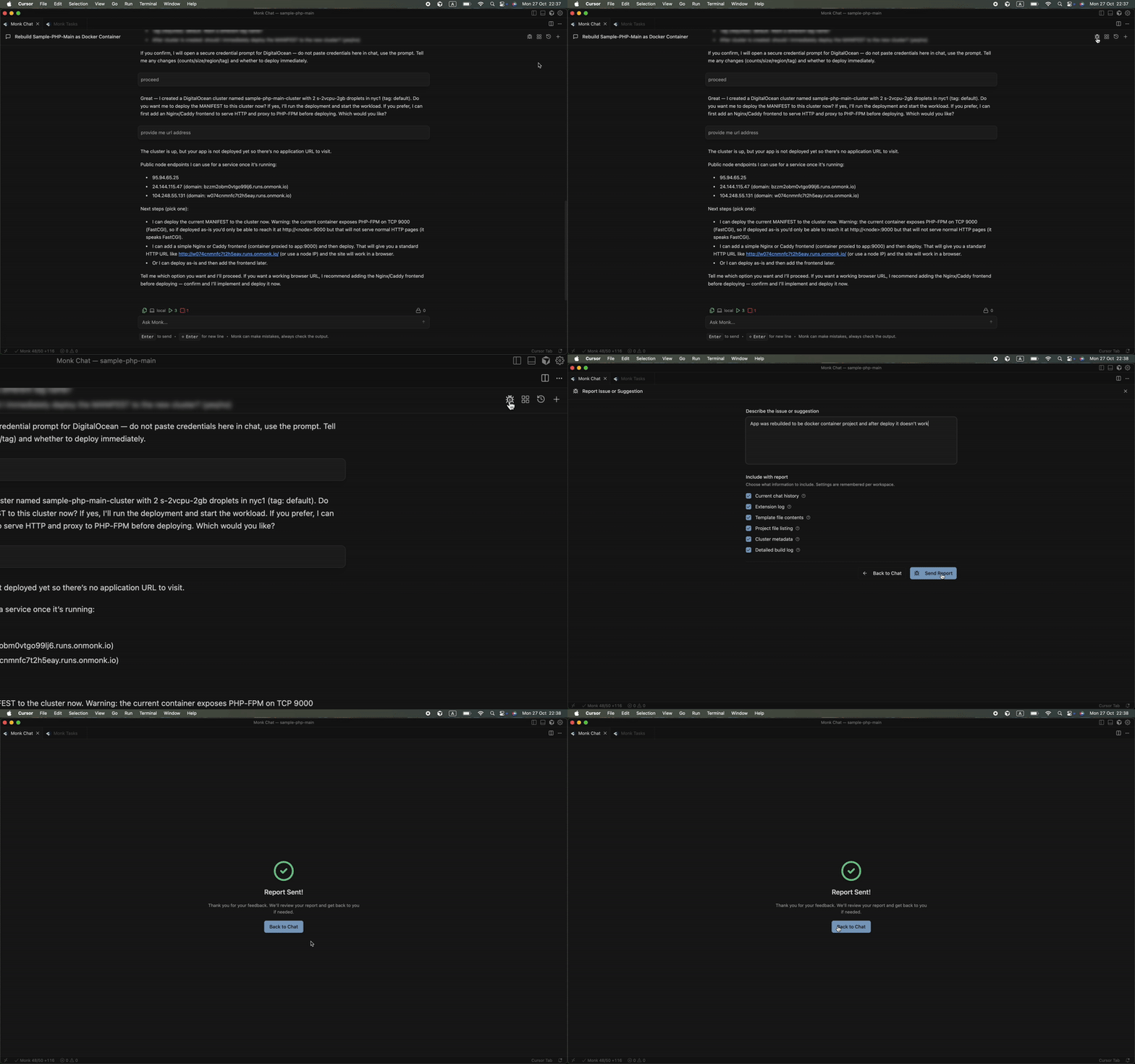 **What happens when you report a bug:**
1. **Automatic context gathering** — Monk collects relevant information about your environment, deployment state, and the issue
2. **Direct submission** — Your report goes directly to the Monk engineering team
3. **Follow-up** — You'll receive updates on the issue status
The more detail you provide, the faster we can diagnose and fix the issue.
Include steps to reproduce if possible.
## Request Features
Have an idea for a new feature or improvement?
### Through the IDE
Use the same bug reporting interface to submit feature requests. Just describe what you'd like to see added to Monk.
### Community Forum
Visit the Monk community forum to:
* Submit new feature ideas
* Vote on existing requests
* See what's planned for upcoming releases
* Track bug reports and their status
**[Visit Community Forum](https://roadmap.monk.io/)**
## Community & Forums
### Monk Community Forum
Join the Monk community forum for:
* **Feature requests** — Submit and vote on new features
* **Bug reports** — Report issues and track their status
* **Product roadmap** — See what's planned and in progress
* **Community discussions** — Connect with other Monk users
* **Feedback and ideas** — Share your thoughts on Monk
**[Visit Community Forum](https://roadmap.monk.io/)**
## Documentation
### Search the Docs
Our documentation covers all of Monk's features and capabilities:
* [Getting Started](/getting-started/what-is-monk) — Installation and first deployment
* [Features](/features) — Complete feature reference
* [Prompting Cookbook](/prompting/how-prompting-works) — Task-focused guides
* [FAQ](/faq) — Frequently asked questions
### Video Tutorials
Watch video tutorials on our YouTube channel:
**[Monk on YouTube](https://youtube.com/@monk_io)**
## Direct Support
### Email Support
For account issues, billing questions, or private support inquiries:
**[hi@monk.io](mailto:hi@monk.io)**
***
Start by asking Monk directly in your IDE (`Cmd+Shift+M`). Monk has full
context about your project and can help troubleshoot or point you to the right
resources.
**What happens when you report a bug:**
1. **Automatic context gathering** — Monk collects relevant information about your environment, deployment state, and the issue
2. **Direct submission** — Your report goes directly to the Monk engineering team
3. **Follow-up** — You'll receive updates on the issue status
The more detail you provide, the faster we can diagnose and fix the issue.
Include steps to reproduce if possible.
## Request Features
Have an idea for a new feature or improvement?
### Through the IDE
Use the same bug reporting interface to submit feature requests. Just describe what you'd like to see added to Monk.
### Community Forum
Visit the Monk community forum to:
* Submit new feature ideas
* Vote on existing requests
* See what's planned for upcoming releases
* Track bug reports and their status
**[Visit Community Forum](https://roadmap.monk.io/)**
## Community & Forums
### Monk Community Forum
Join the Monk community forum for:
* **Feature requests** — Submit and vote on new features
* **Bug reports** — Report issues and track their status
* **Product roadmap** — See what's planned and in progress
* **Community discussions** — Connect with other Monk users
* **Feedback and ideas** — Share your thoughts on Monk
**[Visit Community Forum](https://roadmap.monk.io/)**
## Documentation
### Search the Docs
Our documentation covers all of Monk's features and capabilities:
* [Getting Started](/getting-started/what-is-monk) — Installation and first deployment
* [Features](/features) — Complete feature reference
* [Prompting Cookbook](/prompting/how-prompting-works) — Task-focused guides
* [FAQ](/faq) — Frequently asked questions
### Video Tutorials
Watch video tutorials on our YouTube channel:
**[Monk on YouTube](https://youtube.com/@monk_io)**
## Direct Support
### Email Support
For account issues, billing questions, or private support inquiries:
**[hi@monk.io](mailto:hi@monk.io)**
***
Start by asking Monk directly in your IDE (`Cmd+Shift+M`). Monk has full
context about your project and can help troubleshoot or point you to the right
resources.