

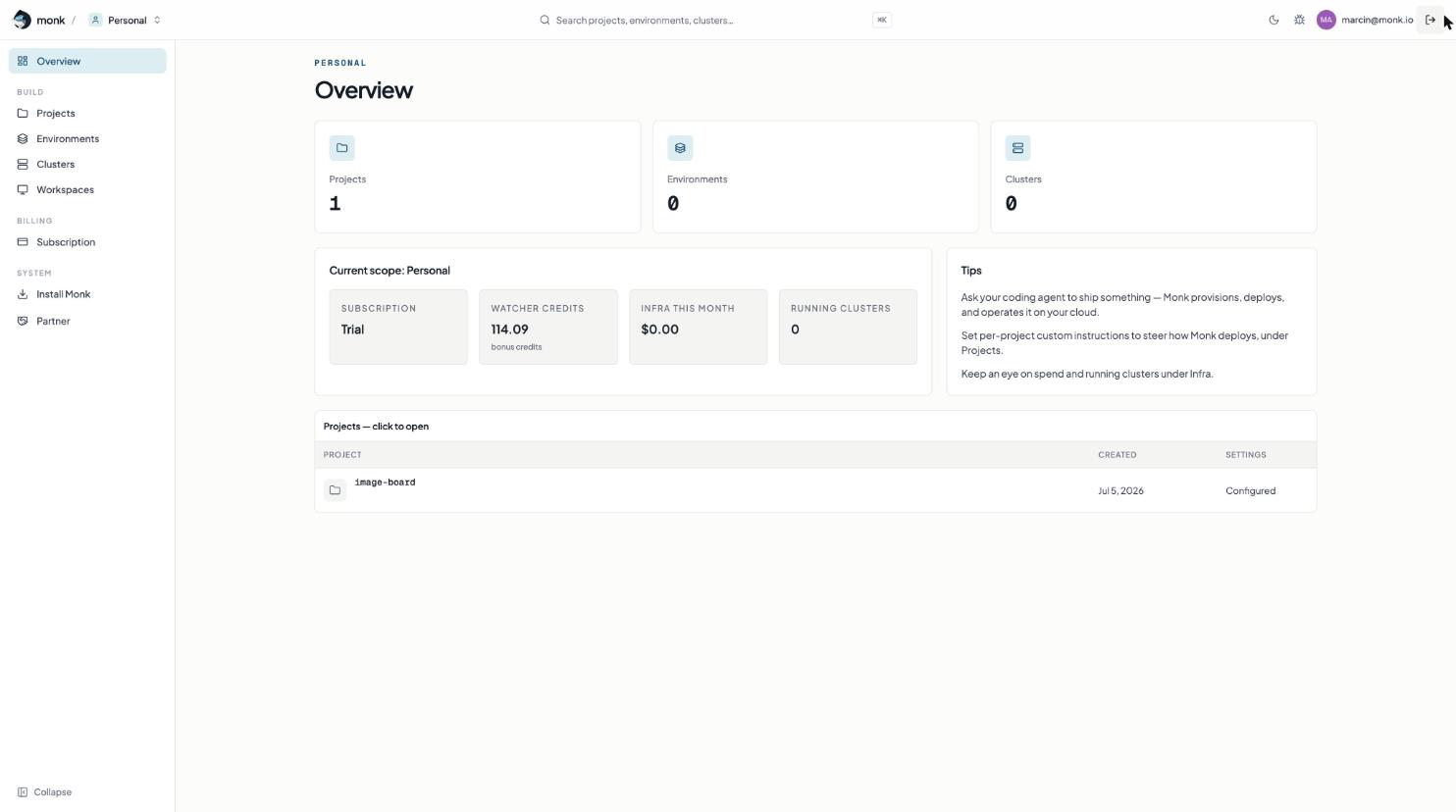
Finding Your Way Around
The top bar has a context switcher: flip between your Personal scope and any team, and optionally focus a single project. Global search (⌘K) jumps to any project, environment, or cluster. The top-right corner has a theme toggle, your account menu, and a bug icon for reporting issues directly to the engineering team.What’s Where
Overview — landing page with project, environment, and cluster counts, subscription status, watcher credits, and infrastructure cost for the month. Build — Projects (create, custom instructions, capsule schedules), Environments (including PR-preview capsules with branch, PR link, and preview URL), Clusters (live status, members, and per-cluster detail), and Workspaces (editor workspaces linked to projects). Access Control (teams) — Members with role management and email invites, Roles with a permission builder for custom roles, and Assignments binding roles to members with project or environment scope. Observability (teams) — Audit: the event log of everything agents and members did, grouped into traces, filterable by project. Billing — Infra shows cloud cost and Monk fees per cluster and month; Subscription manages your plan, seats, and Stripe billing portal. System — Settings for cluster access policy, org-wide custom instructions, and billing alerts; Install Monk for connecting coding agents.Reporting Bugs
Click the bug icon in the top-right corner, pick Bug, Feature, or Other, and describe the issue. You can also report from your coding agent with/monk report a bug — see Getting Help.
Team collaboration
How teams, invites, and shared clusters work